Welcome to the BLOX Digital (formerly TownNews) customer community! Connect with other BLOX Digital customers—and with us—to suggest features, share best practices and ask questions.
Though BLOX Digital representatives often participate in discussions, this is not a customer service site. For immediate help, call 800-293-9576 or submit a support request via our online ticketing system.
No similar topics found.

0
 Video: Simple Player block
Currently when a YouTube video is finished playing in the Video: Simple Player block, Youtube puts in a link (or several links depending on the size of the block) to related videos. These videos may or may not be related to your site. They are chosen by Youtube, not TownNews or your staff.
We are wondering what the community would prefer as the default. The choices are to a) keep things as they are and have YouTube supply links to related videos or b) don't show any related videos at all after your video is done playing.
We are wondering what the community would prefer as the default. The choices are to a) keep things as they are and have YouTube supply links to related videos or b) don't show any related videos at all after your video is done playing.

0
Answered
 Edit Comments Tab Rules of Conduct?
It is possible to edit the Rules of Conduct displayed on the Comments tab of articles? If so can we do it ourselves (in the templates maybe) or do would we have to open a ticket?
Thanks.
Thanks.

Answer
Christine Masters
12 years ago
Hi Kevin!
It is a macro that can be edited in the site component. If you have template access and know about the site component, it is in the messages file. If not, you can open a support ticket and they can do it for you or help you. =)
Christine
It is a macro that can be edited in the site component. If you have template access and know about the site component, it is in the messages file. If not, you can open a support ticket and they can do it for you or help you. =)
Christine

0
Answered
Remove AP from front end search results
Is there an easy way to remove all AP from the front end of search results page?
Answer
Christine Masters
12 years ago
Hi Craig!
Here are details on how to add search parameters:
http://docs.townnews.com/kbpublisher/Search-Queries_5555.html
So, to exclude ap, the parameter would be &nfl=ap (for ap flagged articles).
This parameter can be added to any search form on the site via a hidden input field. Ask Customer Support if you need help setting this up. =)
Here are details on how to add search parameters:
http://docs.townnews.com/kbpublisher/Search-Queries_5555.html
So, to exclude ap, the parameter would be &nfl=ap (for ap flagged articles).
This parameter can be added to any search form on the site via a hidden input field. Ask Customer Support if you need help setting this up. =)

+4
Under review
Obit asset type?
I would like BloxCMS and TCMS to have an obituary asset (a customized article asset) with common fields for obituaries such as dates of birth and death, last name, first name, middle initial, etc. Maybe even times for services

0
Answered
Is there a way to modify the RSS output from BLOX sections?
We're launching a new app and it's only pulling in what is displayed in the RSS feed, which happens to be a single photo and a paragraph.
This is understandably problematic as it doesn't allow the full article to be displayed and makes all our collections pointless to our app audience.
So, what can I do to make our RSS feed show the entire article and all (or even more) associated photos?
This is understandably problematic as it doesn't allow the full article to be displayed and makes all our collections pointless to our app audience.
So, what can I do to make our RSS feed show the entire article and all (or even more) associated photos?
0
Answered
Sort rules Random
When I set a blocks sort rules to (random) and have the query size set to 1 for the amount of assets to show, it should change the asset that is showing when I refresh, correct? it is not changing though.
Answer
Christine Masters
12 years ago
It doesn't reload every page refresh, but it should change every "page build." Or, any time an updated page is built and cached - which should be every 5 - 10 minutes, depending on the page and the situation, etc.

0
Answered
AP Flag
OK, maybe I am being blond. :) It wouldn't be the first time.
We are testing the Asset Index: Headlines block on our front page. However, we are feeding AP stories into the block and the "AP" flag is showing.
According to the docs, we can hide a flag, but I've tried every different configuration I'm not getting it to go away.
I'm not doing something right. Anyone? Thanks in advance.
We are testing the Asset Index: Headlines block on our front page. However, we are feeding AP stories into the block and the "AP" flag is showing.
According to the docs, we can hide a flag, but I've tried every different configuration I'm not getting it to go away.
This is from the documention: skipped_flags
With this setting, specific flags can be turned off. For example, if you have a block that pulls in assets that are flagged featured, every asset would have a featured icon next to it. To turn it off: skipped_flags = featured.I'm not doing something right. Anyone? Thanks in advance.

0
Answered
Having to authenticate EVERY DANG TIME...
Kelly Thomas (DE Admin) 12 years ago
•
updated by Aaron Gillette (Marketing Director, TownNews) 12 years ago •
4
Having to authenticate EVERY DANG TIME I want to watch a video discourages me from actually watching training videos. 1PWord won't even create a login >:-(
http://townnews.com/shared-content/perform/?domain_name=townnews.com&form_template=training_videos&tra
http://townnews.com/shared-content/perform/?domain_name=townnews.com&form_template=training_videos&tra

0
Answered
AP Syndication requirements in Webinar: What's new in BLOX CMS (December, 2014)
Christina Masters mentioned new AP syndication requirements in the December 2014 Webinar. I'd like more information about the exact requirements. Is there an announcement from the AP or documentation that you could refer me to?
Answer
Christine Masters
12 years ago
Hi Jennifer!
We have a great doc on this here:
http://docs.townnews.com/kbpublisher/How-do-I-set-up-an-Associated-Press-Syndication-Channel_8966.html
You'll need to get your login information from AP. But, other than that, it is very easy! =)
We have a great doc on this here:
http://docs.townnews.com/kbpublisher/How-do-I-set-up-an-Associated-Press-Syndication-Channel_8966.html
You'll need to get your login information from AP. But, other than that, it is very easy! =)

0
Under review
smart truncating
User today wanted to know where the rest of a caption was. Seems they were looking at the sildeshow block and the caption was truncated mid-word at about 180 characters.
I was wondering about truncating in general... when doing so instead of truncating at the exact character count... Could you not go back the last space prior to that and truncate there with a "..." appended.
In the example (see image below) the truncated caption would be;
"DES MOINES, Iowa — Farmers set new corn and soybean records last year, harvesting the largest crops ever as a cool summer allowed the plants to mature under mostly favorable ..."
instead of
"DES MOINES, Iowa — Farmers set new corn and soybean records last year, harvesting the largest crops ever as a cool summer allowed the plants to mature under mostly favorable condit"
That way the reader would receive an indication the text was truncated purposefully and and was not ;an error.
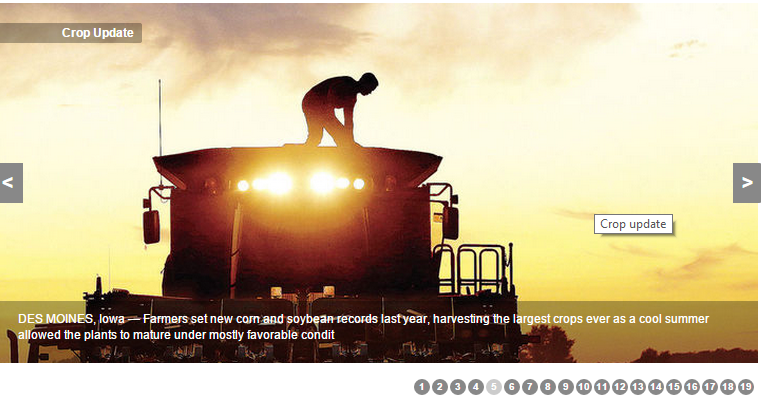
I was wondering about truncating in general... when doing so instead of truncating at the exact character count... Could you not go back the last space prior to that and truncate there with a "..." appended.
In the example (see image below) the truncated caption would be;
"DES MOINES, Iowa — Farmers set new corn and soybean records last year, harvesting the largest crops ever as a cool summer allowed the plants to mature under mostly favorable ..."
instead of
"DES MOINES, Iowa — Farmers set new corn and soybean records last year, harvesting the largest crops ever as a cool summer allowed the plants to mature under mostly favorable condit"
That way the reader would receive an indication the text was truncated purposefully and and was not ;an error.
0
Answered
Leverage browser caching
Craig V 12 years ago
in BLOX CMS
•
updated by Patrick O'Lone (Director of Software Development) 12 years ago •
4
Does anyone know if we have access to .htaccess file in blox to leverage browser caching

0
Answered
settings > Jobs > youtube
Can I create a mrss job feed from youtube to create individual youtube assets in blox?
Answer
Christine Masters
12 years ago
Hi Craig!
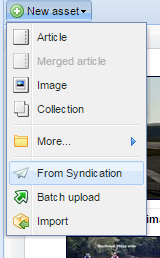
I would actually recommend the Syndication tool. It's free and should be available under Editorial.
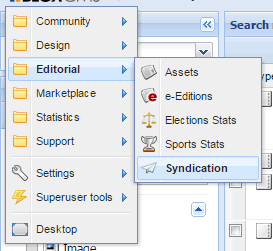
Using the Syndication tool, you can set up a channel to YouTube - based off of a user account or a keyword.
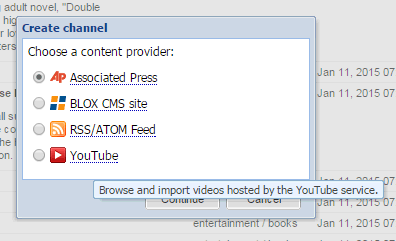
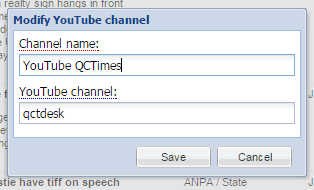
Then, you can either just pick and choose from the Syndication channel the items you want (it is really nicely integrated with Editorial).
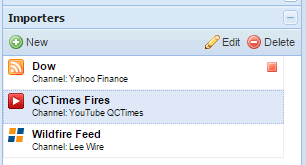
Or you can create an importer to feed all of the items in automatically as YouTube assets. You can assign them a keyword, flag, section, delete date, etc.
I would actually recommend the Syndication tool. It's free and should be available under Editorial.
Using the Syndication tool, you can set up a channel to YouTube - based off of a user account or a keyword.
Then, you can either just pick and choose from the Syndication channel the items you want (it is really nicely integrated with Editorial).
Or you can create an importer to feed all of the items in automatically as YouTube assets. You can assign them a keyword, flag, section, delete date, etc.

0
Answered
Custom Properties for Site User Accounts?
I see that custom properties are able to be set for site user accounts, which is interesting.
However, I found nothing in the documentation about them. Are they available for use in UTL or elsewhere in Blox?
However, I found nothing in the documentation about them. Are they available for use in UTL or elsewhere in Blox?

0
Answered
Can we allow users to select multiple answers in a poll?
We post a yearly "Top 10" poll where we ask readers to vote for the top news stories of the year. We've used PollDaddy in the past. Trying to reproduce something similar in TN, but I don't see a way to allow users to select more than 1 answer (i.e. "you may select up to 10 from this list"). Is there a custom property that allows us to set the max. number of items a reader may vote for?
Customer support service by UserEcho

